.png?width=300&height=50&name=kb-logo-alt%20(1).png)
Opening the HTML5 Panel
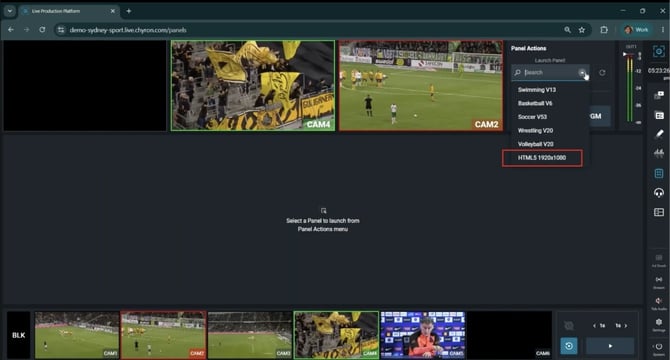
In the Control Panel tab, open the Launch Panel drop down menu and select the HTML5 Panel.
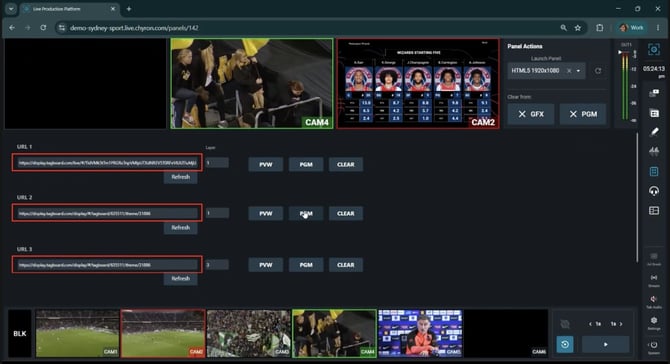
The HTML5 Control Panel consists of URL fields, layering options, and Preview, Program, and Clear buttons. This allows for easy, single-click graphics operation during a livestream.
Adding Your Tagboard URLs
1. Insert your Tagboard URL(s) into the URL input fields.
2. Click Refresh to load the content.
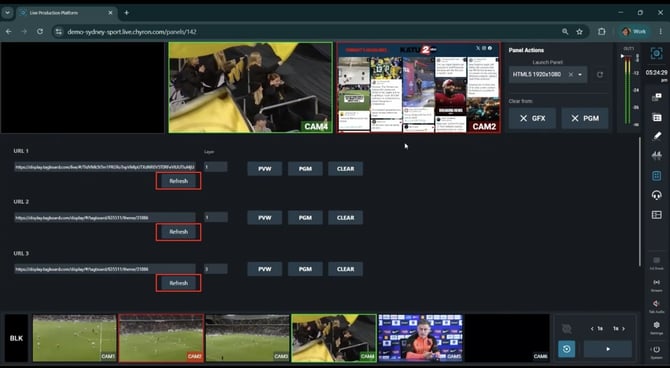
Note: You do not need to refresh again during a livestream unless you want to change the URL.
Layer Logic
Understanding how layers work in the HTML5 Control Panel:
-
URLs on different layers will stack on top of each other
-
Higher layer numbers stack on top of lower layer numbers
-
Negative numbers are accepted
Going Live
Once your Tagboard graphics are loaded, use these controls to manage them during your livestream:
-
Click PVW (Preview) to see it internally before going live
-
Click PGM (Program) to send the overlay to your live output
-
Click CLEAR to remove the overlay from the screen instantly
Have questions about using Tagboard graphics in your production workflow?
Check out "Getting Started with Producer" and "Create & Manage Live Display Outputs" for more information on taking Tagboard live.